 ®
WordPress MCP support is one of the biggest changes coming to the platform, and most business owners haven’t heard of it yet. In short, it will let AI assistants like Claude and ChatGPT connect directly to your WordPress site and carry out tasks for you. Here’s what it is, what’s changing, and what it means for your business.
1. What MCP actually is
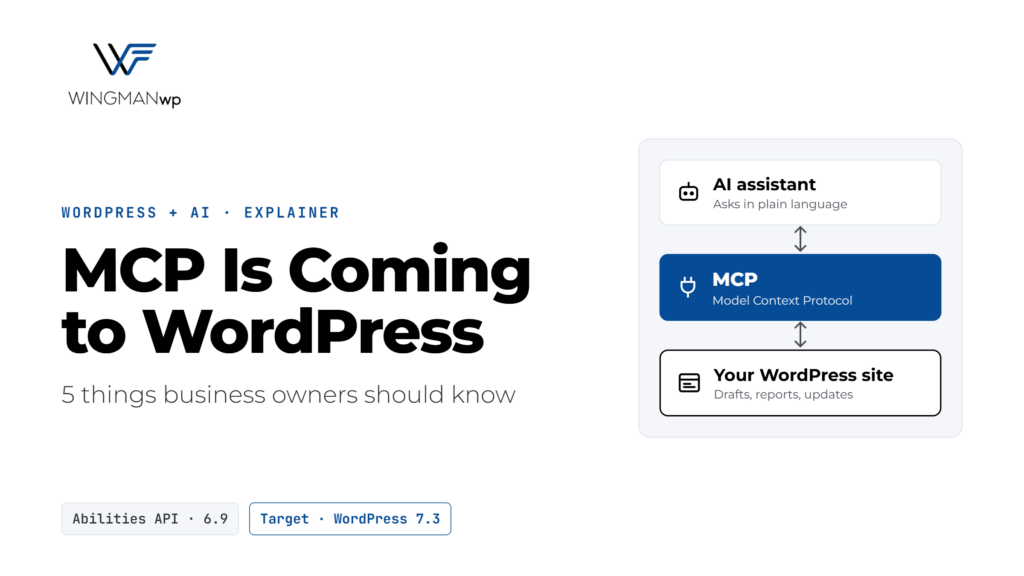
MCP stands for Model Context Protocol. It’s an open standard that lets AI assistants connect to other software in a safe, structured way. Think of it as a universal plug: instead of every AI tool needing its own custom integration, any MCP-compatible assistant can connect to any MCP-compatible system.
With WordPress MCP, your site can tell an AI assistant exactly what it’s allowed to do, such as reading posts, creating drafts or checking settings, and the assistant can then do those things when you ask it to in plain language.
2. WordPress is making MCP part of the default experience
This isn’t a side project. The groundwork is already in place:
- WordPress 6.9 added the Abilities API, a central list of the actions a site can perform, which AI tools and automation can discover and use.
- The official MCP Adapter plugin turns those abilities into tools that AI assistants can use. Version 0.7.0, released on October 2, 2026, was the first release published to the WordPress.org plugin directory.
- In October 2026, WordPress leadership approved making wordpress MCP a standard part of the WordPress experience. A new proposal sets out four priorities: built-in MCP connectivity, more built-in abilities, easier and safer sign-in for AI tools, and a simpler setup for users. The target is WordPress 7.3, with the 7.2 release cycle (due December 8) used to lay the foundations.
In other words, WordPress MCP is moving from “experimental” to “built in” over the next few releases.
3. What WordPress MCP could do for your business
Once it’s set up, you could ask an AI assistant to handle everyday website work in plain language, for example:
- “Draft a post summarizing everything we published in October, with links to each article.”
- “List all pages that haven’t been updated in over a year.”
- “Update the price on these five products and save them as drafts for me to review.”
- “Check which plugins need updates and tell me which ones are critical.”
For busy teams, that means less time clicking through the dashboard and more time on the work that actually grows the business.
4. The risk: access and permissions
Any tool that can act on your website needs careful limits. An AI assistant connected through WordPress MCP works with the permissions of the user account it signs in as, so if that account is an administrator, the assistant can potentially do anything an administrator can.
A few sensible rules:
- Give AI tools their own account with only the permissions they need, such as Editor or Author, not Administrator.
- Start with read-only tasks like reports and summaries before allowing anything that changes the site.
- Keep a human in the loop. Have the assistant save changes as drafts for review instead of publishing directly.
- Track what happens with an activity log, so every AI action can be reviewed and undone.
- Only connect AI tools you trust, and remove access you no longer use.
5. What to do now
There’s no need to rush. WordPress MCP is still evolving, and the protocol itself is changing quickly. But it’s worth getting ready:
- Keep WordPress up to date, since the built-in abilities arrive through core releases.
- Review who has administrator access to your site today.
- Think about which repetitive website tasks your team would most like to hand off.
- Test any MCP setup on a staging copy of your site first, never straight on your live site.
Do I need WordPress MCP right now?
No. It’s an optional feature today, available through the official MCP Adapter plugin, and it’s mainly being used by developers and early adopters. For most businesses, the right move is to understand it now and adopt it once it’s built into WordPress and the tools around it have matured.
Is it safe to connect an AI assistant to my website?
It can be, with the right setup. Use a dedicated account with limited permissions, start with read-only tasks, review changes before they go live, and keep an activity log. Problems usually come from giving AI tools full administrator access.
Will WordPress MCP replace my web team or agency?
No. It can speed up routine tasks like drafting, reporting and simple edits, but someone still needs to set it up safely, decide what the AI is allowed to do, and look after the site’s security, performance and updates.
How WingmanWP can help
AI tools are only as safe as the website they connect to. At WingmanWP, we help businesses adopt new WordPress features the careful way: tested on staging first, with the right permissions, backups and monitoring in place.
Curious how AI could save your team time on your website? Talk to WingmanWP and we’ll help you work out what’s useful, what’s safe, and what can wait.
Sources: WordPress for the Agentic Web (Make WordPress AI), MCP Adapter on GitHub
 Ayesha UmarWritten by